Guide · Updated
RAW vs JPEG on Android
What the phone does to the JPEG, and what the DNG keeps.
A JPEG is a finished picture: the phone has already chosen its white balance, tone curve, contrast, noise reduction and sharpening, and rounded each color to 256 steps. A RAW file, which Android saves as a DNG, is what the sensor read, with none of those choices made: more levels, white balance as a setting, and no phone processing to undo. Shoot JPEG if you like how the phone renders. Shoot RAW + JPEG if you will edit, and keep the JPEG for the days you don’t.
On a phone the trade is different from a camera’s. The JPEG often comes from several frames merged, and the RAW from one, so the RAW can be the noisier file. And not every Android camera writes RAW at all.
01 · Difference
What is the difference between RAW and JPEG
| RAW (DNG) | JPEG | |
|---|---|---|
| What it holds | One value per pixel, as the sensor read it through its color filter, plus what a developer needs to make a picture of it: black and white levels, color matrices, the white balance the camera measured. | A finished picture: three 8-bit channels (red, green, blue) per pixel, after the phone has developed it. |
| Levels | 10 to 16 bits, in linear light. On the tested phone 10 bits, black at 64 and white at 1023: 960 steps. | 256 steps per channel, after a tone curve has spent them where the eye looks. |
| White balance | A setting. Change it later and nothing is lost. | Baked in. Moving it far shifts colors that are already rounded off. |
| The phone’s processing | None of it: no tone curve, local tone mapping, color enhancement, noise reduction or sharpening. | All of it, decided by the phone at the moment of capture. |
| Corners | Uncorrected. The correction travels in the file where the phone provides it, for the developer to apply. | Corrected. |
| Size | About 25 MB a frame on a 12 MP phone (4080 × 3072 × 2 bytes, our arithmetic). | A few MB. |
| Opens in | A raw developer: Lightroom, Snapseed, Camera Raw, darktable, RawTherapee. | Everything. |
The tested phone is the CMF Phone 2 Pro, the phone Clack is tested on. The steps are our arithmetic: 1023 − 64 = 959, so 960 values from black to white.
02 · DNG
What is a DNG file
DNG, Digital Negative, is a raw file format Adobe published in September 2004 as an open specification, built on TIFF/EP. It holds the sensor’s data and, in the same file, what is needed to develop it: the sensor’s black and white levels, its color matrices, the white balance the camera measured, the orientation, and optional corrections to apply (the opcodes).
Cameras each had their own raw format (CR3, NEF, ARW); Android settled on DNG. Its DngCreator writes one from a Camera2 RAW frame and the capture’s metadata, so a DNG from any Android app opens in any raw developer that reads DNG, which is nearly all of them.
A DNG is not a picture yet. The sensor sees each pixel through one red, green or blue filter, so the developer has to work out the other two colors (demosaicing), then apply white balance, a color matrix and a tone curve. The phone does the same steps for its JPEG, its own way.
03 · The phone
What the phone does to the JPEG
A phone’s JPEG is developed by its camera driver (the HAL) the moment you press. Google’s HDR+ paper describes the Pixel’s pipeline: it underexposes a burst of frames, merges them, lifts the shadows region by region (local tone mapping), adds an S-curve, sharpens, and shifts sky and foliage hues. Other phones do a version of the same.
We measured one phone, the CMF Phone 2 Pro, by shooting seven scenes with a JPEG and a DNG of the same exposure each (ISO 100 to 3391) and plotting one against the other:
- Tone
- Indoors, one curve for the whole frame. Outdoors, sunlit ground and walls lifted up to about a stop beyond that curve; 5–6 % of the frame lifted more than half a stop.
- Texture
- Smooth even at ISO 3391: noise reduction leaves watercolor, sharpening leaves halos along fine edges.
- Highlights
- Under 1 % of pixels reach white in any channel, and where they do the sensor was full too. The DNG had little more to give there.
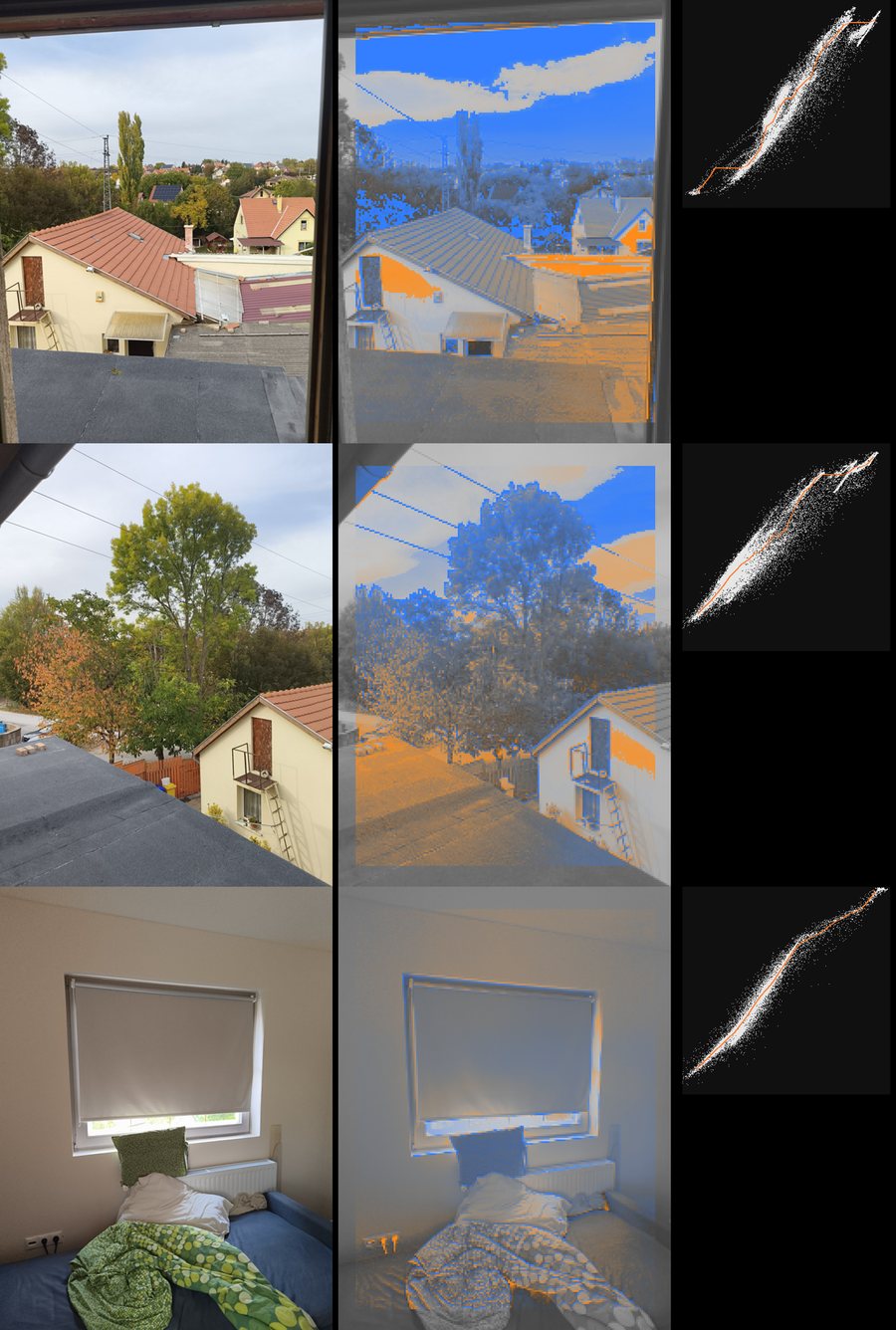
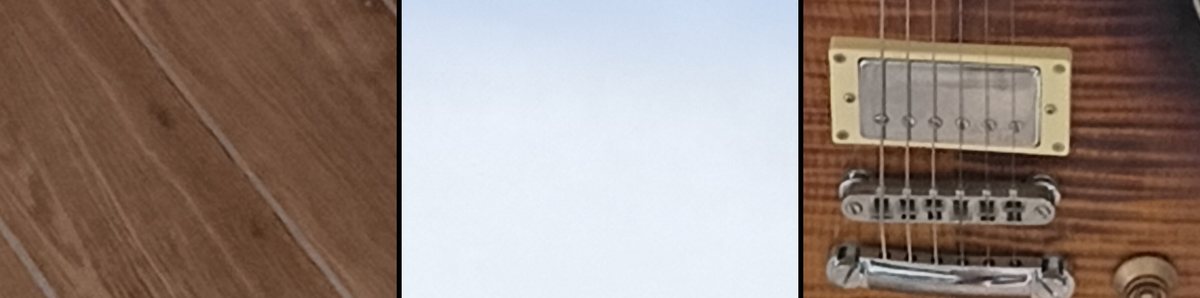
None of this is in the DNG. Developed neutrally on a computer, the same frames looked flat next to the JPEGs: gray skies, milky blacks. The gap was the phone’s local tone mapping, contrast and saturation. At ISO 3391 the DNG also showed color speckle that the phone’s noise reduction had removed.
04 · Choose
Should you shoot RAW or JPEG?
RAW is worth it when you will edit and want to start from what the sensor saw. JPEG is worth it when the picture as it comes out is the one you want. RAW + JPEG keeps both, at the cost of space.
| When | Shoot |
|---|---|
| You like how the phone, or your chosen look, renders it | JPEG |
| You will edit the photo, and color and white balance matter | RAW + JPEG |
| Mixed light: a lamp, a window and a screen in one frame | RAW + JPEG |
| You want the phone’s local tone mapping and sharpening out of the picture | RAW |
| Night, high ISO, and no time to develop | JPEG (a merged one, if your phone merges frames) |
| Storage is short, or photos back up to a paid cloud | JPEG |
What changes on a phone
On a camera, RAW mostly buys room: highlights and shadows the JPEG threw away. On a phone the sensor is small and the room is smaller. On the tested phone the highlights were nearly all there in the JPEG already, and a single RAW frame at high ISO was noisier than the phone’s JPEG. What RAW buys on a phone is control: white balance after the fact, and a picture free of the phone’s tone mapping and sharpening.
Some phones’ RAW is itself merged from several frames. Samsung calls its Expert RAW “computational raw”. Such a file is cleaner, but it is no longer one exposure.
05 · Shoot
How to shoot RAW on Android
- Check that the camera writes RAW. The back camera has to report Camera2’s RAW capability. A probe app shows it, or the one-line adb check in our Camera2 API guide. Without it, no app can save a DNG.
- Turn on RAW + JPEG in the camera app. Pixel Camera: Settings, More settings, Advanced, turn on RAW/JPEG control, then RAW + JPEG in the photo settings. Samsung: set the picture format to RAW and JPEG and shoot in Pro mode, or install Samsung’s Expert RAW app. Other camera apps built on Camera2 have their own switch.
- Shoot. Each press saves a JPEG and a DNG of the same frame, usually under the same name.
- Find the DNG. It is in the camera’s folder under DCIM beside the JPEG. Google Photos marks the pair with a RAW badge; Clack’s roll marks it with an amber dot.
- Develop it. Open the DNG in a raw developer, on the phone or on a computer, set white balance and exposure, and export a JPEG.
Menus move between versions; Google’s and Samsung’s pages, linked below, have the current ones. A DNG is about 25 MB, so a thousand frames take 25 GB. Google Photos backs RAW photos up when backup is on, so they count against cloud storage too.
06 · Develop
How to edit a DNG on Android
Snapseed (free, from Google) opens DNGs in its Develop tool: exposure, shadows, highlights, contrast, white balance as temperature and tint. Google says it edits DNGs “on any device that can capture DNG”. Lightroom for mobile opens them too. On a computer: Lightroom, Camera Raw, Capture One, or the free darktable and RawTherapee.
Dark corners
A phone’s lens darkens the corners, and the JPEG corrects it. The RAW does not: on the tested phone the corners need 4.5 to 5.7 times the light, about 2.5 stops. Where the phone provides its correction map, Android writes it into the DNG as opcodes for the developer to apply. A developer that skips them (LibRaw and rawpy, built on it, do) shows the corners dark.
07 · Clack
RAW in Clack
Clack is a film camera app for Android. You choose a film before you shoot, and the JPEG comes out as that film. With Save RAW on (Settings; off by default) it also writes a DNG beside each JPEG:
- The same frame
- The DNG is the RAW of the very frame the JPEG was made from.
- Without the film
- The whole sensor, never altered: no film, no grain, no crop. Develop it however you like.
- Where
- DCIM/Clack, under the JPEG’s name. The roll marks the frame with an amber dot and reads RAW + JPEG. About 25 MB a frame on the tested phone.
- Corners
- The lens’s correction map, as opcodes, where the phone reports one.
- Location
- Only with Save location on (off by default), in the JPEG and the DNG alike.
Save RAW is there only where the back camera reports RAW; elsewhere Settings says “This camera does not write RAW.” If the phone refuses a camera session with RAW in it, Clack carries on with JPEGs alone.
The films are tuned on the phone’s own frames, not on DNGs. On Android phones whose camera offers a contrast curve, Clack sets it straight (y = x), which also turns off the phone’s local tone mapping and color enhancement, so the film’s own curve shapes the tones; the phone still sharpens and denoises lightly. On other phones the films run on the phone’s own frame. Keep the DNG for the frames you also want to develop yourself.
AndroidComing soon to Google Play. More about Clack
Questions
- Is RAW better than JPEG?
- It keeps more: more levels, white balance as a setting, none of the phone’s tone mapping, noise reduction or sharpening. It is not a better picture until it is developed, and on a phone a single RAW frame is noisier than the JPEG the phone merged from several.
- Is DNG the same as RAW?
- DNG (Digital Negative) is a raw file format, published by Adobe in 2004. Android phones write their RAW files as DNG, so on Android RAW and DNG mean the same file.
- Why is my RAW photo flat and dull?
- A DNG holds no tone curve and no saturation boost; the developer applies a neutral one. The phone’s JPEG has a strong S-curve, local tone mapping and color enhancement on top. The difference is the edit the phone made for you.
- Why are RAW files so big?
- They hold every pixel’s value uncompressed or nearly so: about 2 bytes a pixel, so about 25 MB for a 12 MP phone. A JPEG compresses a finished picture and is a few MB.
- Can I convert a DNG to a JPEG on my phone?
- Yes. Open it in a raw developer such as Snapseed or Lightroom, adjust it or not, and export a JPEG.
- Does every Android phone shoot RAW?
- No. The back camera has to report Camera2’s RAW capability. Many do, some do not, and some report it only for some of their cameras.
- Should a beginner shoot RAW?
- Shoot RAW + JPEG if the space allows. The JPEG is there to use, and the DNG waits until you want to edit.
Sources
- Pixel Camera Help: RAW and JPEG photos
- Snapseed Help: Develop, RAW editing
- Samsung Members CamCyclopedia: Expert RAW
- Tom’s Guide: how to take RAW photos on the Galaxy S23 Ultra
- Android reference: DngCreator
- Wikipedia: Digital Negative
- Hasinoff et al., Burst photography for high dynamic range and low-light imaging on mobile cameras (HDR+, 2016)
The CMF Phone 2 Pro’s values were measured on that phone (October 2026): seven scenes with a JPEG and a DNG of the same exposure each, the DNGs developed on a computer. Other phones will differ.