
Guide · Updated
What is film grain
35 mm grain, real and fake.
Film grain is the texture of a film photo, and it is the picture itself: developed silver crystals in black and white film, the clouds of dye that formed round them in color film. The crystals come in a spread of sizes, sit at random and clump, so grain has no grid. Faster films have larger crystals and more grain, and the smaller the negative, the more it is enlarged: from 35 mm, Portra 400’s grain shows in a 4 × 6 inch print and Ektar 100’s stays under the threshold of sight, by Kodak’s Print Grain Index.
A digital photo has no grain. Its speckle is noise, an error of measurement on the sensor’s grid, and any grain in it was drawn: by an editor, an overlay or a camera app. Drawn grain passes for real when it does what film’s does, and this page is about both.
01 · Grain
What causes film grain
Film records light in crystals of silver halide. Development turns the crystals that caught light into specks of black silver; in color film each one also forms a cloud of dye, and the silver is then bleached away. What you see as grain is those specks and clouds and the clumps they form. Larger crystals catch light more easily, which is what makes a film fast, and why fast films are grainy.
- Size
- In measured color negative grain, about 6.5 µm (one dye cloud) and 15 µm (a cluster of them) (Stephenson and Saunders, 2007).
- Pattern
- At random, in a spread of sizes, clumped. In Newson’s grain model, clumping is “an essential visual feature” and grain without it is “clearly unrealistic”.
- Color
- Each of a color film’s three layers grains on its own. The blue-sensitive layer is the coarsest, about twice the green’s on Kodak’s Vision3 500T sheet (read off its chart), which shows as a faint yellow-blue mottle.
02 · 35 mm
How grainy is 35 mm film
Grain is measured on the film, but seen in the print or on the screen, so how much shows depends on the enlargement. Kodak’s Print Grain Index rates the grain of a print as people see it: 25 is the threshold of visibility, and 4 points is a just-noticeable difference. A 35 mm frame is 24 × 36 mm, so a 4 × 6 inch print already enlarges it about four times. The other makers publish RMS granularity, measured on the film itself; Kodak says the two cannot be compared.
| 35 mm film | The maker’s figure | Grain in Clack |
|---|---|---|
| Kodak Ektar 100 | Print Grain Index under 25 at 4 × 6 in, 38 at 8 × 10, 66 at 16 × 20 | Extremely fine |
| Kodak Portra 400 | Print Grain Index 37 at 4 × 6 in, 59 at 8 × 10, 89 at 16 × 20 | Very fine |
| Kodak Gold 200 | Print Grain Index 44 at 4 × 6 in, 64 at 8 × 10 | Very fine |
| Fujifilm Superia X-TRA 400 | RMS granularity 4 (Fujifilm’s measure for color negative) | Very fine |
| Kodak Vision3 500T | Granularity plotted by exposure, no single figure | Very fine |
| Kodak Kodachrome 64 | RMS granularity 10 | Very fine |
| Fujifilm Velvia 100 | RMS granularity 8 | Very fine |
| Kodak Tri-X 400 | RMS granularity 17 (HC-110, dilution B) | Fine |
| Ilford HP5 Plus 400 | None published | Fine |
Lower is finer in both measures. Grain in Clack: the Grain row on each film’s lab slip at box speed (section 06).
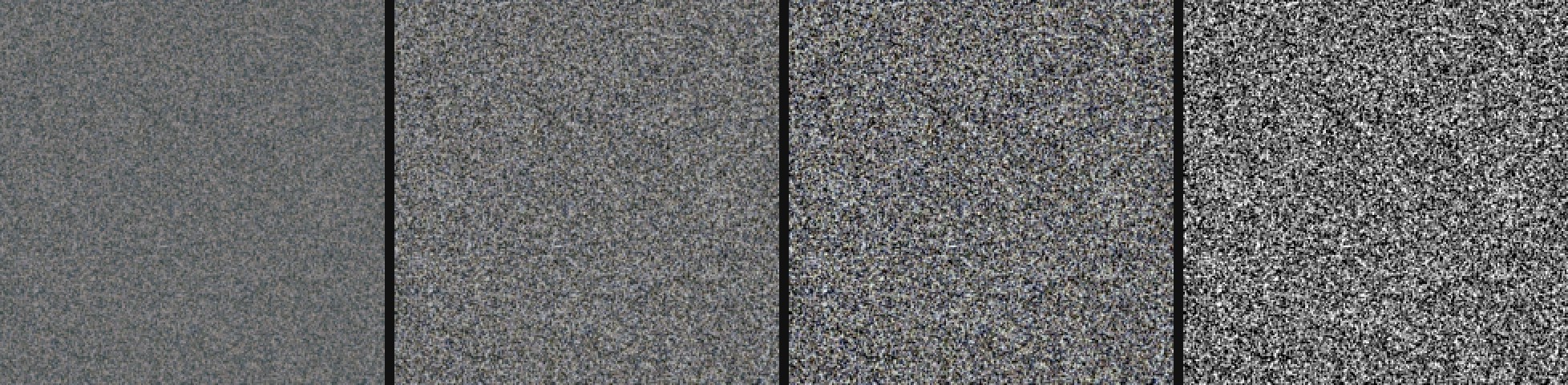
35 mm against medium format
From the same film, a 6 × 6 cm frame (56 mm on a side) needs 2.3 times less enlargement than a 35 mm frame (24 mm on its short side) for the same print: 1.2 doublings. Kodak’s own tables put about 20 points on the index on each doubling, so the medium format print is about 24 points less grainy (our arithmetic).
35 mm grain in pixels
A 35 mm frame drawn 4,080 pixels wide, a 12 MP photo, has 8.8 µm of film in each pixel. Dye clouds of 6.5 µm and clusters of 15 µm are then a texture at the scale of a pixel, not specks you can count (our arithmetic). Grain you can see speck by speck on a phone screen is a heavy crop, a much faster film or a push, or drawn grain that is too big.
03 · Exposure
What makes film grainier
| Change | Grain |
|---|---|
| A faster film | More grain: its larger crystals catch more light. Compare Ektar 100 and Portra 400 above. |
| Underexposure | More, and coarser in the shadows, which only the film’s fastest, largest crystals recorded. |
| Push processing | More: longer development raises contrast, and graininess with it (Kodak, Tri-X datasheet). |
| Overexposure, color negative | A little finer: measured granularity falls at high exposure, and Kodak notes “a noticeable improvement in granularity” from overexposing and pulling. |
| Overexposure, black and white | More: a denser negative, harder to print, with more grain. |
| A bigger print, or a tighter crop | More: about 20 Print Grain Index points each time the enlargement doubles.* |
* Our reading of Kodak’s tables (E-58, E-7022).
Where grain shows in a photo
Not evenly. On a color negative, grain varies the negative’s density by a nearly constant amount, which is a constant error in stops of exposure. A stop takes more of the picture’s brightness range in the light tones than in the dark ones, so grain grows through the mid tones, and the print’s curve squeezes it out into white and into black (our arithmetic). FilmConvert’s developer sees “more visible grain at 80 % white than at pure white”.
Coarseness is a different thing. The shadows of a negative were recorded only by its fastest layer, with the largest grains, so grain there is coarser, if not stronger (Shutterangle; Dominic Case on CML). “Grain is strongest in the highlights” and “grain is coarsest in the shadows” are both said, and both are right about different things. Slide film may run the other way: Case puts its larger grains in the highlights, which are its thinnest parts.

04 · Noise
Film grain vs digital noise
Sensor noise is a measuring error laid over the picture: one value per pixel on the sensor’s grid, colored, because each photosite errs on its own, and worst in the shadows, where little light fell. A phone then smooths it with noise reduction and sharpens what is left. On the phone Clack is tested on, a CMF Phone 2 Pro, the phone’s own JPEGs come out smooth even at ISO 3391: watercolor, with halos along edges, and no texture of their own.
Grain is the picture: no grid, a spread of sizes, shaped by the film’s curve, nearly colorless, and it dithers smooth gradients so they do not band. The film grain overlay page has the two side by side in a table.

05 · Real and fake
Real film grain and fake
Real film grain comes only from film: shoot it and print or scan it. Everything else is drawn, in an editor (Lightroom’s and Photoshop’s Grain, Add Noise), with an overlay, with a film emulation plugin such as FilmConvert or Dehancer, or by a camera app. What tells drawn grain from film’s:
| Quality | Drawn grain gives itself away | Film |
|---|---|---|
| Pattern | A grid: square cells show as a faint screen and as streaks along the rows and columns | At random, no grid |
| Scale | A new value at every pixel and no clumps, the way a sensor’s noise looks; or one size of speck | Round clumps in a spread of sizes |
| Tone | One strength at every tone, light and dark alike | Strongest in the mid tones, gone in white, coarser in the shadows |
| Color | Colored speckle at the scale of a pixel | Nearly colorless; a faint mottle in the larger clumps |
| Video | Frozen while the picture moves through it | New in every frame |
The grid: Lagae et al. (2010). Per-pixel noise as a sensor’s signature: the AV1 film grain paper. Clumps: Newson et al. (2017).
How to add realistic film grain to a photo
- Start from the right size. At full size, 35 mm grain on a 12 MP photo is finer than a pixel. Lightroom’s Grain (under Effects) has Size and Roughness sliders; keep the size low and judge it at 100 %.
- Make it clump. Grain with a new value at every pixel reads as sensor noise. In Lightroom, Roughness makes the grain less uniform; after Photoshop’s Add Noise, a slight Gaussian Blur makes it form round clumps.
- Keep it nearly colorless. Use monochromatic noise, or a faint color only in the larger clumps. Pixel-sized color speckle is the clearest sign of noise.
- Put it under the grade. Film’s grain is in the negative, and the print’s curve shapes it: strongest in the mid tones, gone in white. Grain over the finished picture is the same everywhere. Add it before the tone curve, or mask it out of the highlights.
- Match it to the light. A bright, sharp scene on slow film has little grain; a dim room on fast film pushed a stop has a lot, coarser in the shadows.
- On video, let it move. Each frame of a film is new film, so real grain changes every frame. A still overlay over moving pictures is frozen.
To do it with a layer, make an overlay at the photo’s own pixel size with the film grain overlay tool, which can also grain your photo directly the way film does. The film look guide puts grain with the rest of what makes a photo look like film.
06 · Clack
How Clack draws grain
Clack is a film camera app for Android. Its grain is drawn too, on the phone’s frame, but drawn as part of each film rather than laid over the photo: the finder shows it live and the saved JPEG has it.
- In film’s order
- The grain goes in before the film’s curve, so the curve shapes it as a print does: strongest in the mid tones, gone in white. In the shadows it is drawn 1.8 times larger, and each dye layer has faint clumps of its own, blue the most.
- 35 mm’s size
- Round clumps half a pixel in radius on the 12 MP still, at random, with no grid: 35 mm film’s scale, not visible specks.
- Each film’s own
- Portra 400 is the reference. Gold 200 is 1.27 times as grainy, from Kodak’s index; Ektar 100 a third of Portra’s, which its steeper print brings up to about half as visible, as the index has it; Tri-X 400 twice (Kodak calls its granularity of 17 fine). HP5 Plus has no published figure, so it has four fifths of Tri-X’s, a call on reviewers’ reports, not a measurement. The films with no Print Grain Index (Superia, Kodachrome, Velvia, Vision3) keep Portra’s.
- Follows the light
- A frame the camera had to amplify is film shot under and pushed: grain grows 1.15 times a stop of ISO above 100, up to 1.74 times at ISO 1600 and above. Rate the film under on the lab slip and it grows the same way; rate a color negative over and it gets finer; push it and the steeper curve brings it up. The slip’s Grain row says the result in words Kodak uses, from Extremely fine to Coarse. It is not a control.
- New every frame
- Grain changes with every frame in the finder and in video, as it does on a moving strip of film.
The film base, where the lab slip lives, runs on Android phones whose camera accepts a tone curve of its own; there, film stills ask the phone for no sharpening and no noise reduction, so the grain is the texture. On other phones Clack’s films, grain included, run on the phone’s own frame, smoothed as the phone smooths it. Tested mostly on the CMF Phone 2 Pro.
AndroidComing soon to Google Play. More about Clack
Questions
- What is film grain?
- The texture of a film photo. Each speck is a developed silver crystal (black and white film) or the cloud of dye that formed round one (color film). The crystals come in a spread of sizes, sit at random and clump, so grain has no grid.
- What causes film grain?
- The crystals of silver halide that record the light. Larger crystals catch more light, so faster films have larger crystals and more grain. Development turns the exposed crystals into silver, or in color film into dye clouds, and an enlargement makes their clumps visible.
- Is film grain the same as noise?
- No. Grain is what a film picture is made of: no grid, a spread of sizes, shaped by the film’s curve, nearly colorless. Noise is a measuring error over a digital picture: one value per pixel on the sensor’s grid, colored, worst in the shadows.
- Does 35 mm film have more grain than medium format?
- In the same print, yes. A 35 mm frame is 24 mm tall and a 6 × 6 cm frame 56 mm, so the 35 mm negative is enlarged about 2.3 times as much. On Kodak’s Print Grain Index that is about 24 points more from the same film (our arithmetic from Kodak’s tables).
- Which film has the least grain?
- Of Kodak’s color negatives, Ektar 100, which Kodak calls “the world’s finest grain color negative film”: a 4 × 6 inch print from 35 mm is under the index’s threshold of visibility. Portra 400 is at 37, Gold 200 at 44.
- Does higher ISO film have more grain?
- Yes. Faster films have larger crystals: Portra 400’s 4 × 6 inch prints score 37 on Kodak’s Print Grain Index, Ektar 100’s under 25. Pushing a film past its box speed adds more.
- Does overexposing film reduce grain?
- On color negative film, a little: its measured granularity falls at high exposure. On black and white film it goes the other way: a denser negative, harder to print, with more grain. Underexposure makes both grainier.
- Why do photographers like film grain?
- Partly taste. It also does a job: grain dithers smooth gradients such as skies, so they do not band, and it gives a phone photo the texture its noise reduction removed.
Sources
- Kodak, Print Grain Index (E-58)
- Kodak Portra 400 technical data (E-4050)
- Kodak Ektar 100 technical data (E-4046)
- Kodak Gold 200 technical data (E-7022)
- Kodak Tri-X 320 and 400 technical data (F-4017)
- Kodak VISION3 500T 5219 / 7219 technical data (H-1-5219)
- Kodak on push and pull processing (ECN-2)
- Kodak Kodachrome films (E-55)
- Fujifilm Superia X-TRA 400 data sheet (AF3-0217E)
- Fujifilm Velvia 100 data sheet (AF3-202E)
- Stephenson and Saunders 2007, grain spectra and synthesis
- Newson et al., realistic film grain rendering (IPOL 2017)
- AV1 film grain synthesis (DCC 2018)
- Lagae et al. 2010, a survey of procedural noise functions
- Shutterangle, cinematic look: film grain
- Dominic Case on graininess (CML)
- FilmConvert’s developer on emulating film stocks (No Film School)
The figures are rendered with Clack’s grain and film code, ported to the desktop, on flat gray targets. Pixel sizes and enlargements are our arithmetic from the published figures.