Guide · Updated
Film simulation vs film emulation
What each is, what it is built from, and which is closer to film.
Film simulation is Fujifilm’s name for the looks its cameras build into a JPEG: Provia, Velvia, Classic Chrome, Classic Negative and the rest, each a setting of the camera’s processor, designed by Fujifilm. Film emulation is what editing software, LUT makers and colorists call reproducing a particular film stock, its curve, color and grain, on a digital picture, usually afterwards. In use the words overlap. What tells two looks apart is what each is built from (a designer’s eye, or the film’s published curves and dyes) and when it is applied (in the camera as you shoot, or to a file later).
Below: what a film simulation is and what other makers call theirs, what film emulation is and the two ways it is built, the difference in a table, which is closer to film, why the frame it starts from matters on a phone, and what Clack does.
01 · Simulation
What is a film simulation
A film simulation is a setting in a Fujifilm X or GFX camera that sets the JPEG’s tone curve and color together. The X100VI’s manual lists Provia, Velvia, Astia, Classic Chrome, Reala Ace, Pro Neg. Hi, Pro Neg. Std, Classic Neg., Nostalgic Neg., Eterna, Eterna Bleach Bypass, Acros, Monochrome and Sepia. Some carry the names of Fujifilm’s own films. Others make no claim to a film: Fujifilm says Classic Chrome “is not designed to reproduce an existing film”. Classic Negative, in its words, is modeled on “a photograph taken with SUPERIA film and its print”.
The simulation is the base; the rest of the camera’s image quality menu changes it, and a list of those changes is a Fujifilm recipe. It happens inside the camera, from the sensor’s raw data, so the JPEG comes out finished.
Sony, Nikon and Ricoh film simulations
Other makers have in-camera looks of their own, under other names. People search for them as film simulations too.
| Maker | Called | What it has |
|---|---|---|
| Fujifilm | Film simulations | Provia, Classic Chrome, Classic Negative and the rest, tuned further by a recipe’s settings |
| Sony | Creative Look | Ten looks on the α7CR, among them FL, Film: “moody finish by applying sharp contrast to the calm coloring”, and IN, Instant |
| Nikon | Picture Controls; Imaging Recipes | Picture Controls in the camera; Imaging Recipes, over 130 looks, “film-inspired styles” among them, downloaded from Nikon Imaging Cloud |
| Ricoh | Image Control | Positive Film, and Negative Film since GR III firmware 1.70 (GR IIIx 1.20): “color tones based on various negative films” |
From each maker’s own pages, read 7 November 2026; the looks differ by model.
02 · Emulation
What is film emulation
Film emulation reproduces a film stock on a digital picture: a log video clip in DaVinci Resolve, a RAW in Lightroom, sometimes a finished JPEG. It is sold as LUTs, presets and plugins (Dehancer, FilmConvert and Filmbox are known names), and a few camera apps run it as you shoot. It is built one of two ways.
- By eye, or against scans. Shoot the same scene on film and on digital, or study film’s pictures, then shape the digital until it matches. FilmConvert’s developer described building its stocks from the color information of each digital camera’s sensor.
- From the film’s data. A film’s datasheet publishes each layer’s characteristic curve and spectral sensitivity and the dyes it forms; a paper’s sheet does the same for the print. spektrafilm, an open project by Andrea Volpato, digitizes those for many color films and papers, and a model can print a picture through them.
What a LUT can and cannot do
A LUT, a lookup table, maps each input color to an output color. It can carry a film’s tone and color, and nothing that depends on where a pixel is: no grain, no halation, no glow round a light. And it is made for a particular input. A LUT built for one camera’s log footage gives a different picture on another camera’s, or on a phone JPEG.
What a model built from data runs
As Clack’s engine does it, in the order film works:
- Layer exposures. How much light each of the film’s three layers catches. The layers’ sensitivities overlap, which is how a film renders skin.
- The negative’s curves. Each layer’s characteristic curve off the datasheet: density against log exposure, toe and straight line.
- Interimage. Each layer holds the others back a little, so grays stay gray and colors separate, as a film’s couplers do.
- The print. The paper’s own curves and dyes, printed so that mid gray comes out gray, as a lab prints. Saturated colors come out darker, every color fades into the paper’s white.
- Grain and halation. Drawn in the negative, before the print, so the print’s curve shapes them.
Even then some steps are estimates. Datasheets give no number for how much the layers overlap or hold each other back, so those are fitted. And a digitization can disagree with the sheet: checked against Fujifilm’s own chart, spektrafilm’s Superia X-TRA 400 has its red layer about 1.5 stops more sensitive (our measurement).
03 · Difference
Film simulation vs film emulation
| Row | Film simulation | Film emulation |
|---|---|---|
| Who says it | Fujifilm, for its cameras’ looks; people use it for other makers’ too | Editing software, LUT makers, colorists |
| What it is | A setting of the camera’s processor | A transform that moves a digital picture towards a film stock |
| Built from | The maker’s design. Fujifilm says Classic Chrome “is not designed to reproduce an existing film”; Classic Negative is modeled on “a photograph taken with SUPERIA film and its print” | Depends on the tool: matched by eye, against scans and charts, or from the film’s published curves and dyes |
| When | As you shoot: it is in the JPEG | Usually afterwards, in an editor; some camera apps run it as you shoot |
| What it starts from | The camera’s own raw data, inside the camera | Whatever it is given: log video, a RAW, or a finished JPEG |
| Grain and halation | A grain effect of fixed roughness and size; no halation | Depends on the tool; a LUT alone holds neither |
| A film’s name | Some carry Fujifilm’s film names: Provia, Velvia, Astia, Acros, Eterna | Usually: the film is the point |
04 · Closer
Which is closer to film
Neither word promises it. An emulation made by eye is a designed look with a film’s name on it, and a simulation can be modeled on a film. Classic Negative shows how far the two can still drift. Fujifilm says it “lacks saturation, offering less than the standard PROVIA”, and puts its cyan-green shadows and magenta highlights down to film “left in the cameras for long periods of time”. Superia X-TRA 400 itself, in Clack’s model of its data printed on Crystal Archive paper, comes out richer than Portra 400, with a faint cast of its own. The whole comparison is on the Superia X-TRA 400 page.
What to check in any film look, whatever it is called:
- Its sources. Does it say what it is built from, a datasheet, scans, or taste?
- Its starting frame. Film has one curve. A look laid over a frame the phone or camera has already curved puts a second curve on the first.
- Its grain. Film’s grain is in the negative, so it is strongest in the mid tones, gone into white, coarser in the shadows and on a faster or pushed film. More in what is film grain.
- Its print. A negative is half a picture; the paper gives the other half, which is why the same film looks different printed and scanned.
05 · Phone
Film emulation on a phone
A phone’s JPEG is already finished: tone mapped area by area, sharpened, denoised. On the phone Clack is tested on, a CMF Phone 2 Pro, the phone’s own mapping gave 1.46 stops of picture for each stop of scene in the shadows and 0.60 in the highlights. With a straight tone curve asked of the camera, it was 1.00 at every level (our measurement). A film’s curve belongs on that straight frame.
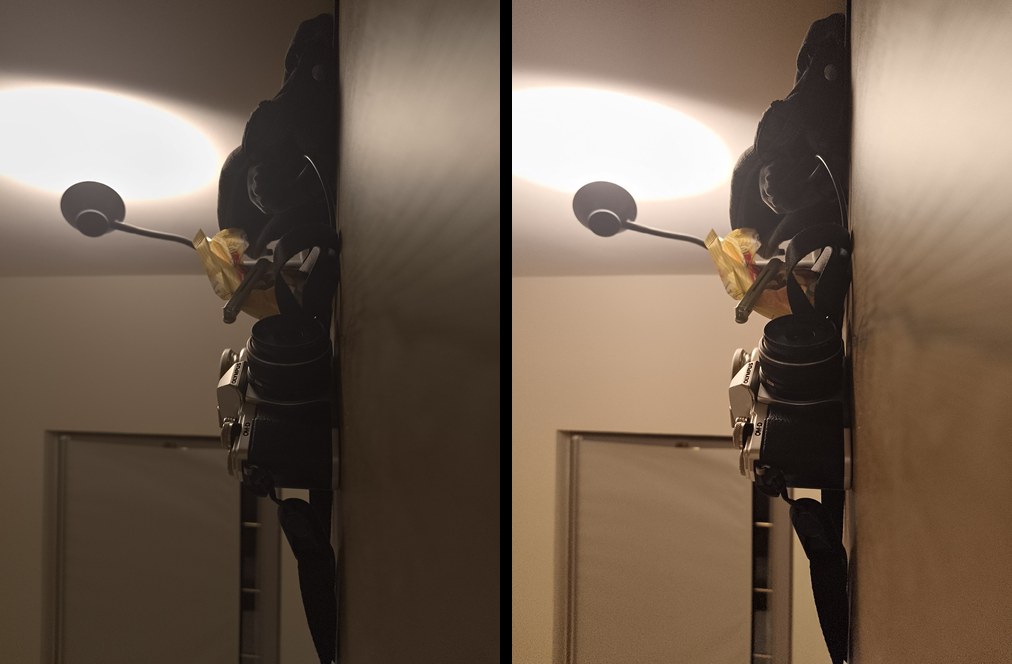
That leaves three routes on a phone:
- Edit a RAW. A DNG has none of the phone’s tone mapping, so a film profile or LUT in an editor starts from the sensor’s data. One photo at a time; see RAW vs JPEG on Android, and how to make photos look like film for the steps.
- A filter on the JPEG. Quick, and on top of the phone’s processing. The film filter runs Clack’s eight films on a photo in the browser, nothing uploaded.
- A camera app that runs the film. The look in the finder as you shoot, as a simulation is on a Fujifilm, from a frame the app asked for.
06 · Clack
A film emulation that shoots like a simulation
Clack is a film camera app for Android. By the words on this page its films are emulations, each built from the real film’s data, and they work like a simulation: you pick one before you shoot, see it live in the finder, and the JPEG comes out finished. Eight films: Portrait 400 (based on Kodak Portra 400), Minilab 400 (based on Fujifilm Superia X-TRA 400), Chroma 64 (based on Kodak Kodachrome 64), Golden 200 (based on Kodak Gold 200), Vivid 100 (based on Kodak Ektar 100), Cinema 500T (based on Kodak Vision3 500T), Press 400 (based on Ilford HP5 Plus 400) and Street 400 (based on Kodak Tri-X 400).
- From the data
- Each film’s curves and dyes from its datasheet (the color films as digitized by spektrafilm; Tri-X 400 and HP5 Plus read off Kodak’s and HARMAN’s sheets), printed on the paper it was made for, or seen as a slide.
- The film base
- On Android phones whose camera offers a contrast curve, Clack asks for the straight frame above, with the phone’s local tone mapping and color enhancement off, and the film’s curve is the only one. On other phones the films run on the phone’s own frame.
- Grain and halation
- Drawn before the film’s curve, as in a negative. The grain grows with the ISO the camera needed.
- Recipes
- A film and a few changes, written in one line and passed on as a Fujifilm recipe is. Minilab 400 is the film behind Classic Negative.
Clack is not a Fujifilm and does not copy Fujifilm’s simulations. The phone still sharpens and denoises lightly. Tested mostly on the CMF Phone 2 Pro.
Free to download. More about Clack

Questions
- What is film simulation?
- Fujifilm’s name for the looks its X and GFX cameras build into a JPEG: Provia, Velvia, Astia, Classic Chrome, Reala Ace, Pro Neg., Classic Neg., Nostalgic Neg., Eterna, Acros and others. Each is a setting of the camera’s processor, a tone curve and color together, designed by Fujifilm; some carry the names of Fujifilm films. People also say film simulation for other makers’ looks.
- What is film emulation?
- Reproducing a particular film stock on a digital picture: its tone curve, its color, its grain and often its halation. It is done in editing software, plugins and LUTs, mostly afterwards; some camera apps do it as you shoot. An emulation can be matched by eye or built from the film’s published data.
- Is film simulation the same as a filter?
- Not quite. A filter or preset is usually laid over a finished photo. A film simulation is part of how the camera makes the JPEG from its raw data, so it shapes the picture before anything is finished. Neither one is the film itself.
- Do Sony, Nikon and Ricoh cameras have film simulations?
- Under other names. Sony has Creative Look (FL is its film look), Nikon has Picture Controls and downloadable Imaging Recipes, Ricoh has Image Control with Positive Film and Negative Film.
- Is film emulation more accurate than film simulation?
- Not by the word alone. An emulation can be matched by eye too, and a simulation can be modeled on a film, as Classic Negative is on Superia. What decides it is what the look is built from and what frame it starts from. Ask whether it names its sources, whether it starts from a flat or raw frame, and whether its grain follows the tones as film’s does.
- Is Clack a film simulation or a film emulation?
- By these words, an emulation: each of its eight films is modeled on the real film’s published curves and dyes and printed on the paper it was made for. It is applied as you shoot, live in the finder and baked into the JPEG, as a simulation is on a Fujifilm.
Sources
- Fujifilm, X100VI owner’s manual: Image quality setting
- Fujifilm, Film Simulation “Classic Chrome” (2014)
- Fujifilm, X-Pro3 Stories #2, “Learning from Film” (2019): Classic Negative
- Sony, α7CR help guide: Creative Look
- Nikon, Picture Controls step by step
- Nikon, Imaging Recipes
- Ricoh, GR III and GR IIIx firmware: Image Control Negative Film
- spektrafilm: digitized film and paper datasheets (Andrea Volpato, CC BY-SA 4.0)
- Andrea Volpato, spectral film simulations from scratch
- FilmConvert’s developer on emulating film stocks (No Film School, 2012)
- Filmbox, grain
Fujifilm, Classic Chrome, Classic Negative and the other simulation names are Fujifilm’s; Creative Look is Sony’s, Picture Control and Imaging Recipes Nikon’s, Image Control Ricoh’s; Portra, Gold, Ektar and Kodachrome are Kodak’s. Clack is not affiliated with any of them.